
Share Straight to the Point
Keep producers informed. Keep your agency connected.


Timely risk management content, ready for you to share.
Your customers look to you for more than a policy. They rely on you for guidance, perspective and information that can help them make confident decisions.
AgriSompo’s Straight to the Point video series gives you useful, easy-to-understand content you can share with farmers and producers throughout the year. Each episode explores a timely crop insurance or risk management topic, helping you provide additional value and stay connected between important policy conversations.
Expert content. Less work for you.
You do not have to create every customer communication from scratch. AgriSompo provides the content and tools so you can focus on the relationships behind it.
Use Straight to the Point to:
Share timely information with your customers.
Start conversations about emerging risks and coverage needs.
Reinforce your role as a trusted risk management adviser.
Stay visible between renewals and other key touchpoints.
Add valuable content to your social media, website, emails or text messages.
Made to share. Easy to use.
Choose the approach that works best for your agency and customers:
Social media: Share or repost content from AgriSompo’s YouTube, Facebook, LinkedIn, X or Instagram channels.
Your website: Embed an episode so visitors can watch it directly on your site.
Email: Download a ready-to-use Outlook message or create your own note using the suggested copy.
Text message: Copy the episode link and send it directly to customers who may benefit from the topic.
Make it your own
Add a short personal introduction when sharing an episode. You may connect the topic to local conditions, questions you are hearing or upcoming decisions your customers may be considering.
Even one sentence from you can turn a shared video into a more personal, relevant customer touchpoint.
Agent tip: You do not need to explain the entire topic in your post or message. Introduce why it may matter to your customers, then let the video provide the details.
More than a video
Every Straight to the Point episode includes a companion Agent Toolkit featuring ready-to-share information you can use in emails, newsletters, customer meetings and producer events. Download the toolkit and put timely risk management insights directly into the hands of your customers.
Ready to connect with your producers?
Choose an episode, select the channel that works best for your audience and start sharing.
Instructions
Share on Facebook
Sharing Straight to the Point content from AgriSompo’s social channels is one of the quickest ways to provide valuable information to your followers.
Ensure you are logged into your Facebook account, then follow the steps described below:
- Visit the AgriSompo Facebook page.
- Find the video post you want to share.
- Click Share below the post.
- Select Share to Feed or Share to a Page You Manage.
- Add your own message if desired.
- Click Post.
Agent tip for suggested message:
Managing risk starts with understanding the options available. This quick Straight to the Point video from AgriSompo offers helpful information about [topic]. Take a look, then contact our agency if you would like to discuss how it may relate to your operation.

Share on LinkedIn
Sharing Straight to the Point content from AgriSompo’s social channels is one of the quickest ways to provide valuable information to your followers.
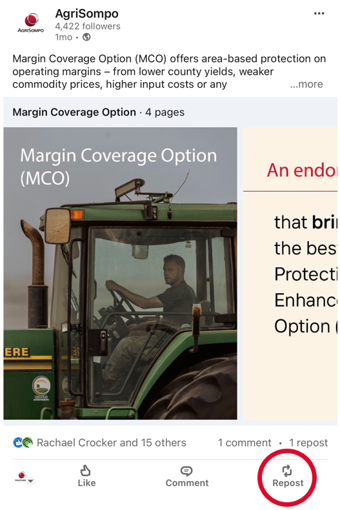
Ensure you are logged into your LinkedIn account, then follow the steps described below:
- Visit the AgriSompo LinkedIn page.
- Locate the video post.
- Click Repost.
- Select Repost with Your Thoughts.
- Add a short introduction or comment.
- Click Post.
Agent tip for suggested message:
Farmers and producers face changing risks throughout the year. AgriSompo’s latest Straight to the Point episode explains [topic] in a clear, concise format. Watch the video and reach out if you would like to continue the conversation.
Share on X
Sharing Straight to the Point content from AgriSompo’s social channels is one of the quickest ways to provide valuable information to your followers.
Ensure you are logged into your X account, then follow the steps described below:
- Visit the AgriSompo X page.
- Find the video post.
- Click the Repost/Retweet icon.
- Select Repost or Quote.
- If using Quote, add your own comment.
- Publish the post.
Agent tip for suggested message:
What should producers know about [topic]? This Straight to the Point video offers info to help you better understand your risk management options. [Link]

Share on Instagram
Sharing Straight to the Point content from AgriSompo’s social channels is one of the quickest ways to provide valuable information to your followers.
Ensure you are logged into your Instagram account, then follow the steps described below:
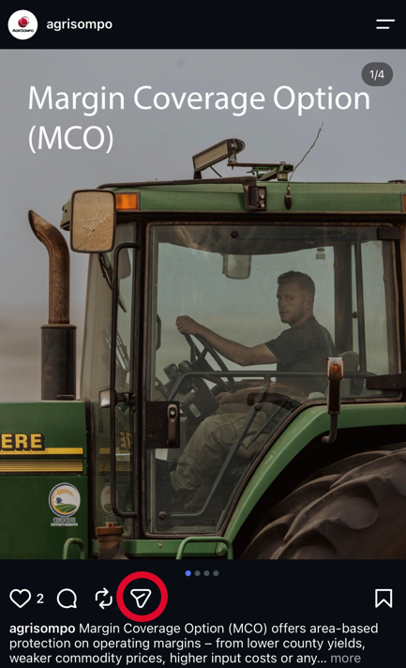
- Visit the AgriSompo Instagram page.
- Navigate to the AgriSompo Instagram post you want to share.
- Tap the Share icon below the post.
- Select Add to Story.
- The post will appear in your Instagram Story draft.
- Add text, stickers or a message to personalize the Story if desired.
- Tap your Story to publish.
Agent tip for suggested message:
A quick look at what producers should know about [topic]. Tap to learn more.
Embed an episode on your website
Embedding an episode allows visitors to watch it without leaving your agency’s website.
Start from the AgriSompo YouTube channel.
Step 1: Open the YouTube video you want to share.
- Go to a AgriSompo Straight to the Point video on YouTube.
- Click the Share button below the video.
Step 2: Copy the embed code.
- Select Embed from the sharing options.
- Click Copy to copy the embed code.
Step 3: Add the code to your website.
- Log in to your website editing platform.
- Open the page where you want the video displayed.
- Click the Embed button
- Paste the embed code.
- Save and publish your changes.
Website tip: Introduce the video with one or two sentences explaining why the topic may be relevant to farmers and producers in your area.
Share with an email or text
If you use Microsoft Outlook, we have a ready-to-send downloaded email you can apply. You may also create your own email using the example provided below.
Otherwise, you may create your own email using the examples provided.
Download a premade Outlook message.
Click here to download the email template.
Open the downloaded email and replace the highlighted text with your email signature.
Send the email to your desired recipient(s).
Suggested subject lines:
What producers should know about [topic]
A quick risk management resource for your operation
New video: Understanding [topic]
Create your own email or text message.
Open the video on AgriSompo's YouTube page.
Click Share below the video.
Click Copy Link.
Paste the link into your email or text message. If you like, you may use one of the examples below to write your message.
Customizable example email:
Hello [First Name],
Questions about [topic] can come up as you evaluate risks and make decisions for your operation. I wanted to share this short video from AgriSompo’s Straight to the Point series, which provides a helpful overview:
[Watch the video]
If you have questions or would like to discuss how this topic may relate to your operation, please reach out. We are always here to help.
Thank you,
[Your Name]
[Agency Name]
Share by text
Direct and professional
I wanted to share this quick AgriSompo video about [topic]. It provides useful information as you consider your risk management options: [Link]. Let me know if you have any questions.
Conversational
This short video offers a helpful look at [topic]. I thought it might be useful for your operation: [Link]. Happy to talk through any questions.
Share on Spotify
Sharing Straight to the Point episodes from AgriSompo’s Spotify is one of the quickest ways to provide valuable information to your followers.
Follow the steps described below:
Visit the AgriSompo Spotify channel.
Select the episode you want to share.
Click the share icon and click copy.
Paste the link into your producer communication.
Share from Amazon Music
Sharing Straight to the Point episodes from AgriSompo’s Amazon Music is one of the quickest ways to provide valuable information to your followers.
Follow the steps described below:
Visit the AgriSompo Amazon Music channel.
Select the episode you want to share.
Click the share icon and click copy.
Paste the link into your producer communication.
Have questions?
Connect with your AgriSompo representative or use our Contact Us form!